维苏威的幽灵

于NMA观庞贝遗珍有感
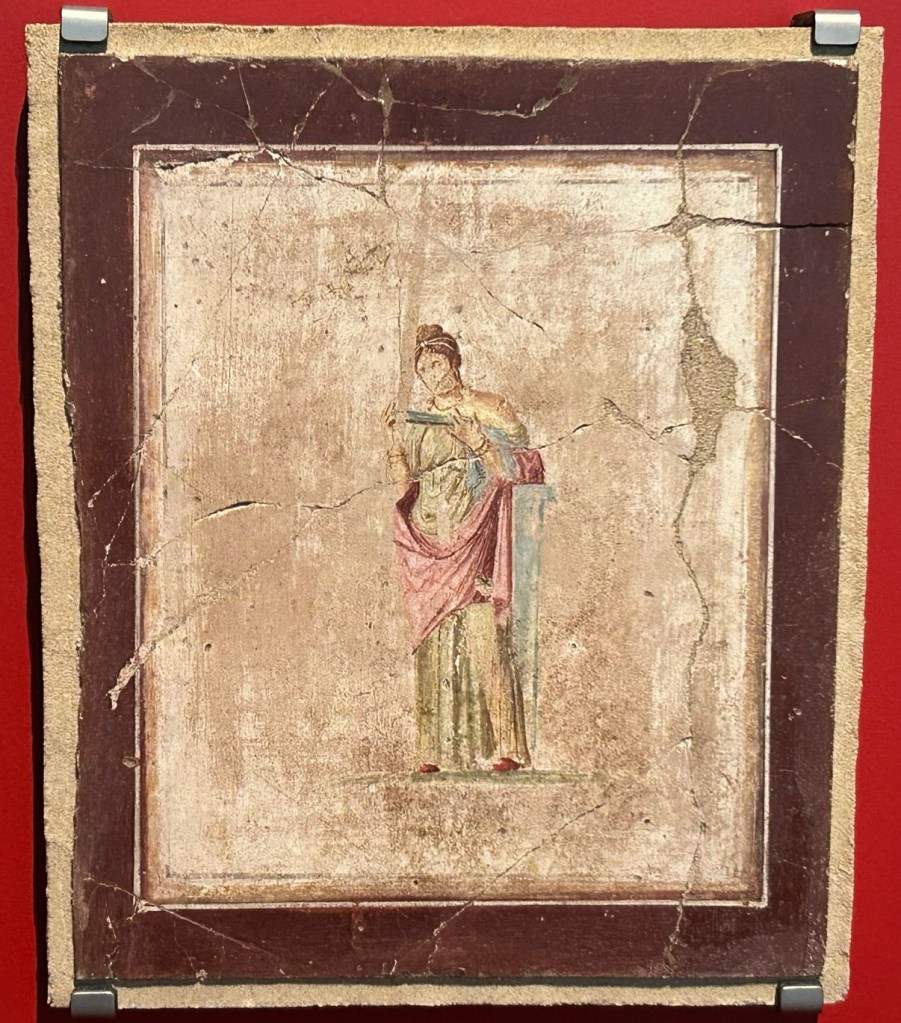
庞贝壁画仿制品,笔者自摄于NMA

“此外,海水忽然向后退去,大地频繁震颤,天空中也传来巨大的轰鸣。很多人举手向神祈祷,更多人则开始相信世界上根本不存在什么神明,以为永恒的黑夜降临了,这便是世界毁灭的终极时刻。”

——小普林尼《致塔西佗书》

爱与美庇佑之城

庞贝古城(Pompeii),爱与美之神维纳斯所庇佑的城市,维苏威火山脚下的明珠,那不勒斯湾的良港。公元前600年由希腊人与腓尼基人建成,公元前80年被罗马人占领并成为罗马帝国的重镇,公元79年被维苏威火山的怒火深埋于尘泥之下,又于1748年重见天日。

庞贝城在相当长的一段时间里都是罗马共和国以及后来罗马帝国的重要城市。维苏威火山肥沃的火山灰土以及第勒尼安海的水气使庞贝拥有了极佳的农业条件,庞贝城周围种植的小麦与橄榄除了满足城内公民的需要外也用于交易,供应了其周边庞大的市场。除了粮食作物外,火山灰土的肥力也供养了数不胜数的葡萄园,其中所蕴含的矿物质也给出产于此地的葡萄酒带来了特殊的风味。源源不断的商品从庞贝城运出,不仅填补了罗马城如黑洞般深不见底的欲望漩涡,也为庞贝城的居民带来了源源不断的财富。

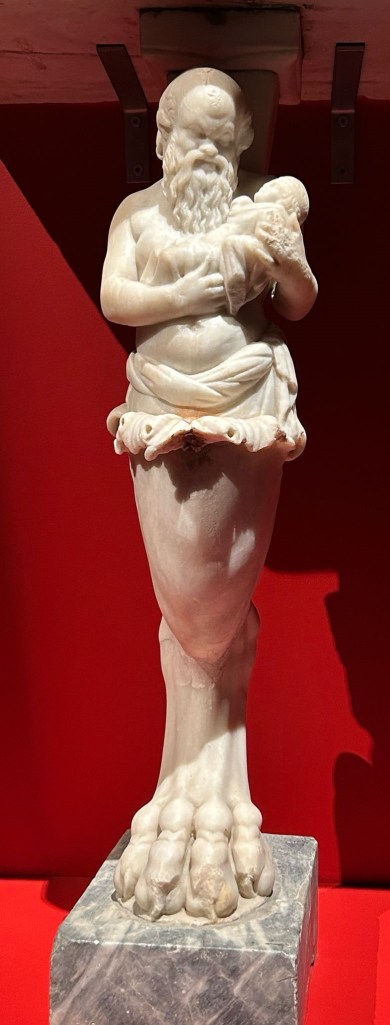
城内雕像,发掘与那不勒斯亲王之家(House of the Prince of Naples),笔者自摄于NMA。

美神庇护之城以市政建筑为核心,环绕以阿波罗神庙、朱庇特神庙等宗教建筑。会堂、竞技场、商场、浴场一应俱全,富裕的居民家中通常拥有花园,花园又以精美的壁画与立柱装饰。这些立柱通常雕饰精美,栩栩如生。正如上图,雕像描绘了希腊神话中森林之神西勒诺斯哺育幼年酒神巴克斯的场景,雕像上西勒诺斯长须飘飘,观之和蔼又不修边幅,眼目所致不一似为醉态,视怀中酒神又带有关切之色,做工之精良可见一斑。更何况这件还算不上是城内雕塑中最精美之作,笔者曾在杂志上看过另一座失落的雕塑“海中的维纳斯”于中国国家典籍博物馆展出,其神态之栩栩远胜此物。其衣衫正如刚出海水一般贴合微皱,更显工匠巧心。惜当时琐事缠身未能一观,实为憾事。

美之城亦为爱之城。罗马时代居民的性观念及其开放,庞贝城的遗址中拥有巨大量的情色主题壁画,甚至有很多富户以色情场景装饰自己的住宅,其中一部分文物大胆到当时的意大利国王在参观这些展品时大为震惊,认为会带坏意国内的猫猫狗狗,遂下令将其中的一部分文物锁到了密室之中。发掘出来的一部分画作直到2000年还要求未成年游客只能在成年游客的陪同下观赏。很可惜,NMA的展出是全年龄向的,笔者未能有机会一睹千年之前的涩图。时庞贝城中有大大小小妓院20多家,要知道当时城中的总人口也只有20000人而已。窥一管而见全貌,爱神庇护之城在“爱”这个方面可以说是“做”得相当充分。但是在庞贝居民皆流连于声色犬马之时,这爱神庇护之城又能有多少真正的爱呢?若舍私念之小爱观天下之大爱,那垒成山的金银本就是由城中的奴隶的血汗所铸,爱神之大爱,又几时能遍及他们呢?又是否是那城中居民耽于欲海,才失去了爱之女神的守护,使永恒黑暗降临的呢?

大理石维纳斯女神像,发掘于庞贝遗址中的波佩娅别墅(Villa Poppaea),笔者自摄。

美也罢,情也罢;爱也罢,欲也罢;从前的一切总归是埋在了如山的砾石之下,爱与美之神庇护之城自此不见天日千余年,这又是否是维纳斯女神所预料的结局呢?可惜断壁残垣之间发掘出的雕像依旧巧夺天工,左腿处断裂经由修复并没有破坏雕像中女神整体身段的柔美协调,三个人物的发丝服饰依旧精细逼真,从此雕像也可以看出,城中的居民并没有忘记他们的守护女神。天火带来永恒的黑暗,也带来了永恒的平静,厚达6米的火山灰遮住了庞贝美轮美奂的壁画,亦挡住了蛮族劫掠的步伐。雕像中女神眉眼低垂,如悲如泣,也许她在为城中枯骨而悲吧!回首锁眉,亦有慈悲之相,千年已过而庞贝遗珍仍闪耀如新,逃过了百年黑暗愚昧时代之残损,示壮美于今人,思岁月之无常,此诚为大爱也。今人得一睹,岂亦爱与美女神之垂怜乎?痴人诳语,莫以为意。

是非转瞬成千年

火山灰遮住了庞贝的美,也挡住了千年岁月的侵蚀。罗马帝国衰亡导致整个欧洲陷入了漫长而黑暗的中世纪,捉襟见肘的帝国财政使得政府没有能力负担庞大且昂贵的公共工程,如大型竞技场和浴场等。与之相匹配的技术也随之退化,比如混凝土工艺以及穹顶建造技术。更令人痛心的是艺术上的退化,衰亡期的罗马人逐渐放弃了从前基于透视与人体解剖学的雕刻技术,致使帝国后期的雕像变得愈发抽象变形。经济上的崩溃也使得帝国无法承担精美大理石雕像的巨大负担,4世纪的君士坦丁凯旋门甚至需要搜刮古罗马时期公共建筑上的艺术品才得以完工。

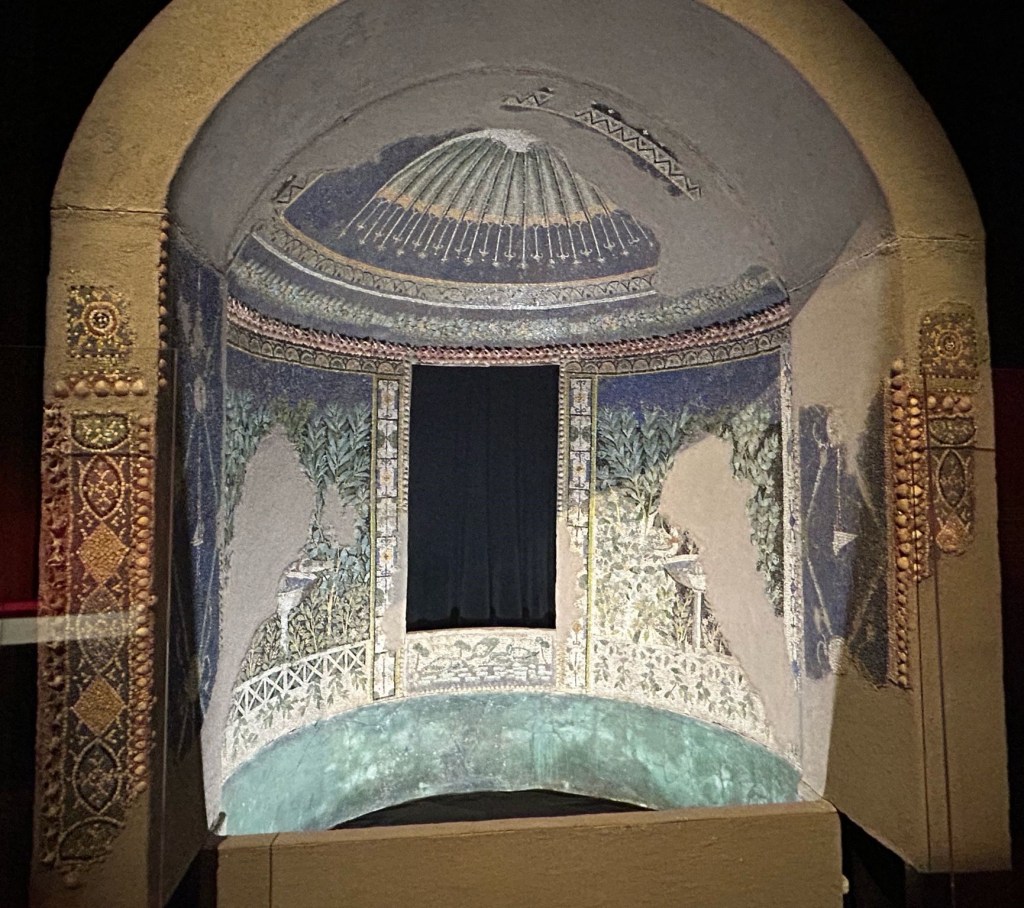
用以装饰庭院凉亭的嵌画拱顶,笔者自摄于NMA.

庞贝于公元79年覆灭,前一年罗马皇帝韦斯帕西亚努斯染热病而崩,新帝提图斯方立。其时距暴君尼禄横死以逾十一年,韦斯巴芗为帝亦十年,其不拘于旧法,以强势手段重整了社会秩序,并恢复了遭受重创的经济,可谓之中兴。无奈其后二帝提图斯与图密善皆非贤君,中兴无以为继,直到20年后皇帝涅尔瓦继位开始五贤帝时期罗马方再度崛起。总体而言,庞贝城覆灭之时罗马正处在罗马治世时期,政局相对稳定,国力也较为强盛。从上图的小拱顶亦可一窥,其墙面饰有橄榄叶以及水禽图案,色彩明快,整体对称性亦上佳。间隔处以几何图案为装饰,配之以青蓝色壁画为底。若其不是放在博物馆中而是置于庭院之内,上有穹顶以挡骄阳,侧有小窗以观风景,再辅以桌凳美酒,千金难易。庞贝地处海滨,贝类螺类繁盛,小亭侧面便以贝壳为装饰,辅之以碎螺壳等物组成的几何图形,其工艺甚至与现代很多类似的工艺建筑有异曲同工之妙。可惜水火无情,小亭整体装饰保存并不完好,未能观其全貌,实在可惜。

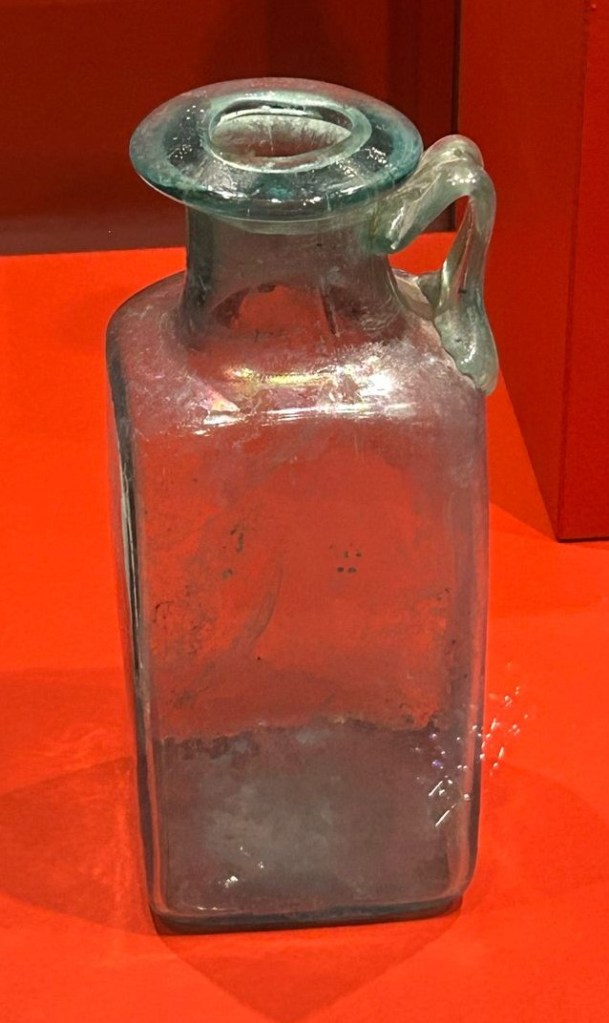
装饰拱顶的马赛克多是彩色石块或是瓷砖陶器等,除了上图拱顶中所表现得较为日常和粗糙的表现形式外也用做更为精细的绘画,比如大名鼎鼎的《亚历山大马赛克》。只可惜此物太过珍贵,NMA并无财力将其自那不勒斯博物馆借展,笔者亦只在杂志与网站上看过图片,虽仍叹服于其工艺繁杂画技高明,但总归与亲眼所见相差甚远。彩色玻璃亦是古罗马镶嵌画材料中的重要一环,罗马人掌握了极其高明的玻璃制作技术,并将之用于生活的方方面面之中。下图即是笔者在展会中看到的玻璃器皿,其制其形与我们今天所用之物并无不同,每每看到它都感慨今人与古人并无不同,更生岁月蹉跎之感。

玻璃瓶,发掘于庞贝城遗址,笔者觉得它可以用来装可乐。笔者自摄于NMA。

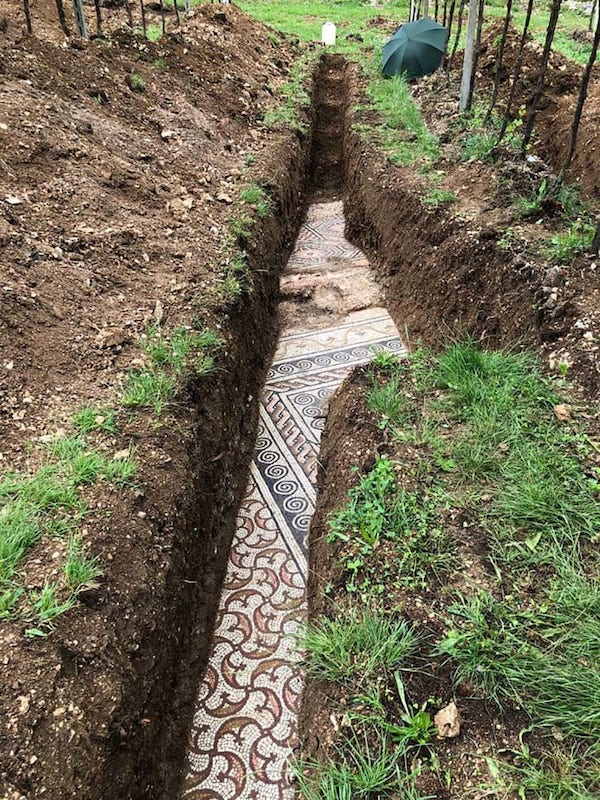
西罗马帝国于公元476年灭亡,西欧古代史亦至此终结,数不尽的典籍珍宝在战乱中被付之一炬,无数珍贵的技术亦自此亡佚。地中海沿岸土地自此屡遭蛮族蹂躏,昔日宏伟的建筑倒塌损毁,化为尘土。华丽的装饰与壮美的雕塑被土壤覆盖,最后归于农田。在2020年,意大利一酒庄在翻土时意外发现了古罗马时期的马赛克地砖,这块地砖保存非常完好,千年的岁月并没能在上面留下什么痕迹。其颜色历尽春秋依旧鲜艳,正如下图。它如同雨后之艳阳,破开乌云般的土壤,在观者眼中留下惊鸿似的背影,引起无限遐思。现代人观之都不免动容,更何况是在礼崩乐坏的中世纪呢?若是当时意大利王国的农夫碰巧挖掘到了类似的文物,又该是如何的震惊,以之为神迹呢?

意大利发现的罗马地砖,图片来源于互联网

不论千年前是谁在上面走过,是身份显赫的皇帝亦或是岌岌无名的奴隶,行者地位何等尊崇,千年之后皆归尘土,只剩下永恒且不朽的艺术珍宝。王侯将相、千秋功业,都不过是过眼云烟。当往事随风逝去,帝国繁华不再,又有谁会记得当年的荣光呢?空留庞贝城内精美绝伦的壁画无言地诉说着,诉说着千年前帝国的强盛。

凤生于烈火之间

一千九百多年前,维苏威火山的怒火吞噬了庞贝城,庞贝带着她永恒的欲望与美丽深眠于火山灰之下。六百多年前,奥斯曼苏丹起大军陷君士坦丁堡,罗马正朔自此断绝,无数知识至此失传。然而失落的智慧终将会回归,它们将由更加先进的知识找回。2022年,意大利政府重启了疫情之后停止的庞贝发掘计划,将以全新的技术更加全面细致的展示庞贝的美好。人类永恒不变的好奇是考古工作的最大推力,而这推力有时候过于强大,以至于考古工作会伤害到文物本身,尤其是在技术并不先进的时代。

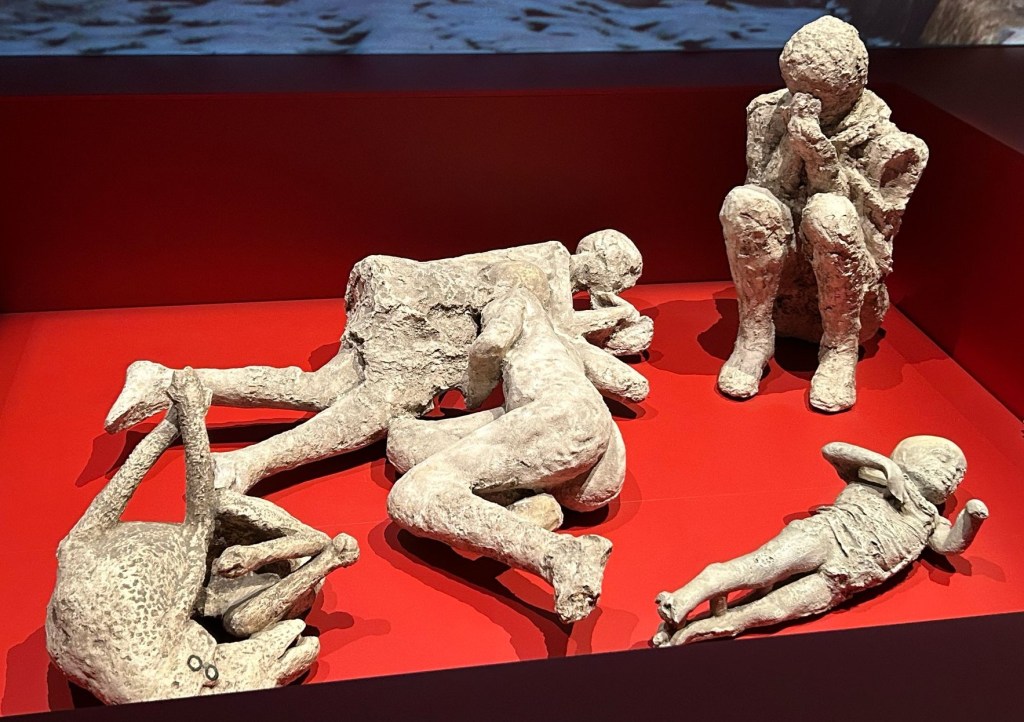
三个成年人、一个儿童、一只家犬。庞贝遗骨,笔者自摄于NMA。

火山灰的高温通常会彻底摧毁遇难者的遗骨,上图所示的这些遗骸多是通过重建火山灰中的空泡得到。在庞贝遗址最初被发掘的时候,负责相关工作的朱塞佩·菲奥勒利采用了一个相当简单粗暴的办法来重现遗骨——向空泡中填充石膏制作铸像。客观的说,这个方法确实相对准确地还原了遇难者生命的最后一刻,但是也同时破坏了可能残存的遗体,对其考古学价值造成了难以估量的巨大损失。不止如此,现代考古学先驱们所采取的发掘方式极其野蛮,对大量的古迹犯下了不可原谅的罪行。像是海因里希·施里曼发掘特洛伊城遗址时采取的爆破式考古方式,抑或是郭沫若(罪人)所主导的对明定陵的破坏性发掘,都是考古史上充满血泪的一笔。一想到无数珍宝随着炸药的轰鸣化为齑粉,又或是因为保存不当而小时的那些宝贵丝绸,笔者难免黯然神伤。

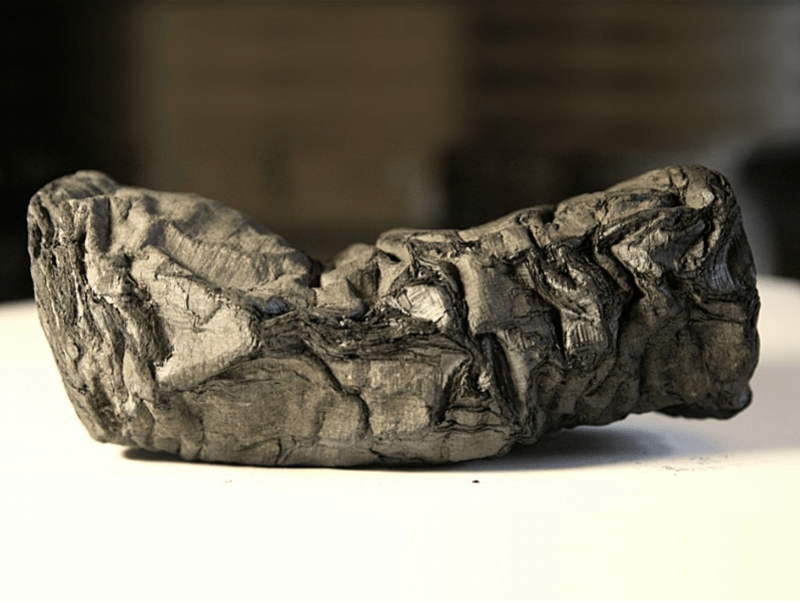
庞贝莎草纸残卷,图片来源于网络。

我们无法改变已经发生的遗憾,也无法倒转时间来保护那些无价的珍宝。大错已然铸下,不蹈覆辙才是重中之重。得幸,科技的进步给了考古学新的机会。上图是从庞贝遗址中的私人图书馆所获的古罗马文书残卷,极度的高温早已使之碳化成卷,而这样的文卷居!然!还!能!复!原!说复原可能言过其实,科学家只是做到了识别其上的部分文字。这些天才们采用了X光断层扫描的方式一层一层的识别书卷,并根据压痕与受力的不同提取出文字,至今已识别了超过140个不同的拉丁文字符。虽然就重现所有的奥秘而言还为时尚早,但是其成就已然斐然。庞贝遗体的发掘亦采用了破坏性更小的方式,现今通用的技术是激光扫描与3D建模,在不破坏任何遗骨的情况下复原庞贝居民的最后一天。笔者在查阅资料时感慨万千,如是早一些掌握这些技术,那些遗珍又何以被破坏呢?若是不困于心中之贪念,存功成不必为我之念,给过去以时间,将难以保存之物留给后世以发掘,又会多多少珍宝避开烟殒之下场,闪耀于今日呢?也许吧,也许总有一天,技术可以先进到能复原之前被破坏的文物,就像庞贝城内的莎草卷一般,亡于烈火焚天之日,又因知识之而复原,如凤飞翱翔于今日。

The Result Type

The Result type is one of the main ways of handling errors in Rust. In Rust, the result of a function execution is usually encapsulated in the Result enumeration, which has two possible values: Ok and Err. Ok indicates that the function was successfully executed and returned the desired result, while Err indicates that an error occurred during the function execution. This treatment makes error handling clear and intuitive.

The Result type encourages developers to handle errors explicitly rather than simply ignoring them. Through pattern matching or if let statements, developers can examine the results returned by a function and handle errors appropriately. This mandatory error handling helps avoid potential program crashes and data corruption.

fn divide(numerator: i32, denominator: i32) -> Result<i32, String> {
   
    if denominator == 0 {
   
        Err("Division by zero is not allowed.".to_string())
    } else {
   
        Ok(numerator / denominator)
    }
}

let result = divide(10, 0);
match result {
   
    Ok(value) => println!("Result: {}", value),
    Err(error) => println!("Error: {}", error),
}

In the above example, the divide function returns a Result type representing the result of the division operation. If the divisor is zero, the function returns an Err value with an error message; otherwise, it returns an Ok value with the quotient. Pattern matching allows us to process the result, printing the result if it succeeds and the error message if it fails.

Panic mechanism

While the Result type is at the heart of Rust’s error handling, the Panic mechanism is also an important error handler in Rust.Panic is a serious error situation, usually indicating that a program has encountered an unrecoverable error, such as an array out of bounds, a null pointer reference, etc. When a Rust program encounters one of these unrecoverable errors, it triggers Panic, which results in the immediate termination of the program and the printing of the associated error message and stack trace.

When a Rust program encounters one of these unrecoverable errors, it triggers Panic, causing the program to terminate immediately and print out the associated error message and stack trace.Panic is an extreme case, usually used to deal with errors that cannot or should not occur.

Although the Panic mechanism can help developers quickly locate and resolve problems, it is not a recommended way to handle errors routinely. This is because Panic will cause the program to terminate immediately, and some important data or resources may be lost. Therefore, developers should avoid triggering Panic as much as possible, and instead handle errors properly through the Result type.

Rust Data Types: Unveiling the Mystique

In the realm of Rust, data types are the magical elements that breathe life into your code. They define the nature of the data that can be stored and manipulated, each with its own unique properties and abilities. This blog post will take you on a journey through the mystical world of Rust data types, including integers, floating-point numbers, booleans, characters, strings, arrays, tuples, slices, and structs.

Integers and Floating-Point Numbers: The Elemental Forces

Integers and floating-point numbers are the elemental forces in the world of Rust. Integers, whole numbers without a fractional component, can be either signed (i8i16i32i64i128isize) or unsigned (u8u16u32u64u128usize). The number following the i or u indicates the number of bits the integer occupies in memory.

Floating-point numbers in Rust are numbers with a fractional component. They can be single-precision (f32) or double-precision (f64).

let x: i32 = 5;

let y: f64 = 3.14;

Booleans and Characters: Truth and Expression

Booleans in Rust are binary data types. They can be either true or false.

Characters in Rust are Unicode scalar values. They’re represented with the char keyword and are 4 bytes in size.

let t: bool = true;

let c: char = 'z';

Strings, Arrays, and Tuples: Language, Collections, and Diversity

Strings in Rust are a collection of characters. They’re represented with the String keyword.

Arrays in Rust are a collection of multiple values of the same type. The size of the array is known at compile time.

Tuples in Rust are a collection of multiple values of different types. The size of the tuple is known at compile time.

let s: String = "hello".to_string();

let a: [i32; 3] = [1, 2, 3];

let t: (i32, f64, char) = (500, 6.4, 'j');

Slices and Structs: References and Customization

Slices in Rust are a reference to a contiguous sequence of elements in an array.

Structs in Rust are custom data types that let you name and package together multiple related values.

let a = [1, 2, 3, 4, 5];

let slice = &a[1..3];

struct Color {

    red: u8,

    green: u8,

    blue: u8,

}

let black = Color { red: 0, green: 0, blue: 0 };

Conclusion

Well, I may have played too much DND to cut down on DND, I’m now full of elf priests using two-handed axes.

Multithreading in Rust

Imagine you’re organizing an expedition. You have a group of brave explorers ready and waiting for your command. In the world of Rust, these explorers are like threads, and you are the programmer using the std::thread module.

Gathering the Explorers

You can summon a new explorer (thread) using the std::thread::spawn function. Just give them a map (closure), and they’ll set off on their adventure (execute code).

use std::thread;

use std::time::Duration;

let handle = thread::spawn(|| {

    for i in 1..10 {

        println!("hi number {} from the spawned thread!", i);

        thread::sleep(Duration::from_millis(1));

    }

});

Waiting for the Explorers to Return

Once the explorer sets off, you get a JoinHandle. This is like a magical communicator that you can use to wait for the explorer to return and hear their report (get the result).

handle.join().unwrap();

In Rust, each explorer corresponds to a thread in the real world. It’s as if each explorer has their own path and goal, and they can explore independently. This is different from some other languages (like Go or Java), where explorers might need to share some paths and goals.

Sharing the Treasure

Sometimes, the explorers need to share some treasure (state). Rust provides some magical tools, like std::sync::Mutex and std::sync::Arc, which can help the explorers to share and modify the treasure safely.

use std::sync::{Arc, Mutex};

use std::thread;

let counter = Arc::new(Mutex::new(0));

let mut handles = vec![];

for _ in 0..10 {

    let counter = Arc::clone(&counter);

    let handle = thread::spawn(move || {

        let mut num = counter.lock().unwrap();

        *num += 1;

    });

    handles.push(handle);

}

for handle in handles {

    handle.join().unwrap();

}

println!("Result: {}", *counter.lock().unwrap());

vitural machine design

use std::cmp::Ordering;
use std::collections::HashMap;
use crate::bytecode::ByteCode;
use crate::value::Value;
use crate::parse::ParseProto;
use crate::coordinate;
use plotters::prelude::*;
use plotters::style::full_palette::{BROWN, GREY, ORANGE, PURPLE};


// ANCHOR: print
// "print" function in Lua's std-lib.
// It supports only 1 argument and assumes the argument is at index:1 on stack.
fn start_draw(state: &mut ExeState, turtle:&mut coordinate, root: &mut DrawingArea<BitMapBackend, plotters::coord::Shift>) -> i32 {
turtle.draw = true;
// println!("The deatil of the turtle is ({},{}), the color is {}, the degree is {}, and turtle drawing is {}",
//turtle.x, turtle.y, turtle.color, turtle.head_degree,turtle.draw);
0
}

fn stop_draw(state: &mut ExeState, turtle:&mut coordinate, root: &mut DrawingArea<BitMapBackend, plotters::coord::Shift>) -> i32 {
turtle.draw = false;
//println!("The deatil of the turtle is ({},{}), the color is {}, the degree is {}, and turtle drawing is {}",
//turtle.x, turtle.y, turtle.color, turtle.head_degree,turtle.draw);
0
}

fn lib_forward(state: &mut ExeState, turtle:&mut coordinate, root: &mut DrawingArea<BitMapBackend, plotters::coord::Shift>) -> i32 {
let get_number = if let Value::Integer(val) = state.stack[state.func_index + 1] {
val as f32
} else {
panic!("Expected an Integer value in the stack");
};
let old_x = turtle.x;
let old_y = turtle.y;

turtle.x += (get_number * (turtle.head_degree as f32).to_radians().sin()) as i32;
turtle.y -= (get_number * (turtle.head_degree as f32).to_radians().cos()) as i32;

let color = match_color(turtle.color);
if turtle.draw {
root.draw(&PathElement::new(
vec![(old_x, old_y), (turtle.x, turtle.y)],
&color,
)).unwrap();
}

0
}
fn lib_back(state: &mut ExeState, turtle:&mut coordinate, root: &mut DrawingArea<BitMapBackend, plotters::coord::Shift>) -> i32 {
let get_number = if let Value::Integer(val) = state.stack[state.func_index + 1] {
val as f32
} else {
panic!("Expected an Integer value in the stack");
};

let old_x = turtle.x;
let old_y = turtle.y;

turtle.x -= (get_number * (turtle.head_degree as f32).to_radians().sin()) as i32;
turtle.y += (get_number * (turtle.head_degree as f32).to_radians().cos()) as i32;

let color = match_color(turtle.color);
if turtle.draw {
root.draw(&PathElement::new(
vec![(old_x, old_y), (turtle.x, turtle.y)],
&color,
)).unwrap();
}

0
}
fn lib_left(state: &mut ExeState, turtle:&mut coordinate, root: &mut DrawingArea<BitMapBackend, plotters::coord::Shift>) -> i32 {
let get_number = if let Value::Integer(val) = state.stack[state.func_index + 1] {
val
} else {
panic!("Expected an Integer value in the stack");
};

let old_x = turtle.x;
let old_y = turtle.y;

turtle.x -= get_number as i32;

let color = match_color(turtle.color);
if turtle.draw {
root.draw(&PathElement::new(
vec![(old_x, old_y), (turtle.x, turtle.y)],
&color,
)).unwrap();
}
0
}
fn lib_right(state: &mut ExeState, turtle:&mut coordinate, root: &mut DrawingArea<BitMapBackend, plotters::coord::Shift>) -> i32 {
let get_number = if let Value::Integer(val) = state.stack[state.func_index + 1] {
val
} else {
panic!("Expected an Integer value in the stack");
};

let old_x = turtle.x;
let old_y = turtle.y;

turtle.x += get_number as i32;

println!("The deatil of the turtle is ({},{}), the color is {}, the degree is {}, and turtle drawing is {}",
turtle.x, turtle.y, turtle.color, turtle.head_degree,turtle.draw);
let color = match_color(turtle.color);
if turtle.draw {
root.draw(&PathElement::new(
vec![(old_x, old_y), (turtle.x, turtle.y)],
&color,
)).unwrap();
}
0
}

fn lib_setx(state: &mut ExeState, turtle:&mut coordinate, root: &mut DrawingArea<BitMapBackend, plotters::coord::Shift>) -> i32 {
let get_number = if let Value::Integer(val) = state.stack[state.func_index + 1] {
println!("The value of the stack is {}", &val);
val as f32
} else {
panic!("Expected an Integer value in the stack");
};

turtle.x = get_number as i32;
println!("The deatil of the turtle is ({},{}), the color is {}, the degree is {}, and turtle drawing is {}",
turtle.x, turtle.y, turtle.color, turtle.head_degree,turtle.draw);
0
}

fn lib_sety(state: &mut ExeState, turtle:&mut coordinate, root: &mut DrawingArea<BitMapBackend, plotters::coord::Shift>) -> i32 {
let get_number = if let Value::Integer(val) = state.stack[state.func_index + 1] {
println!("The value of the stack is {}", &val);
val as f32
} else {
panic!("Expected an Integer value in the stack");
};

turtle.y = get_number as i32;
0
}

fn lib_setpencolor(state: &mut ExeState, turtle:&mut coordinate, root: &mut DrawingArea<BitMapBackend, plotters::coord::Shift>) -> i32 {
if let Value::Integer(val) = state.stack[state.func_index + 1] {
turtle.color = val as i32;
0
} else {
panic!("Expected an Integer value in the stack for the color");
}
}

fn lib_setheading(state: &mut ExeState, turtle:&mut coordinate, root: &mut DrawingArea<BitMapBackend, plotters::coord::Shift>) -> i32 {
if let Value::Integer(val) = state.stack[state.func_index + 1] {
turtle.head_degree = val as i32;
0
} else {
panic!("Expected an Integer value in the stack for the head direction");
}
}
fn lib_make(state: &mut ExeState, turtle:&mut coordinate, root: &mut DrawingArea<BitMapBackend, plotters::coord::Shift>) -> i32 {
todo!();
0
}
fn lib_turn(state: &mut ExeState, turtle:&mut coordinate, root: &mut DrawingArea<BitMapBackend, plotters::coord::Shift>) -> i32 {
if let Value::Integer(val) = state.stack[state.func_index + 1] {
turtle.head_degree += val as i32;
0
} else {
panic!("Expected an Integer value in the stack for the turn degree");
}
}

fn lib_xor(state: &mut ExeState, turtle:&mut coordinate, root: &mut DrawingArea<BitMapBackend, plotters::coord::Shift>) -> i32 {
println!("X value of the turtle is {}",turtle.x);
0
}

fn lib_yor(state: &mut ExeState, turtle:&mut coordinate, root: &mut DrawingArea<BitMapBackend, plotters::coord::Shift>) -> i32 {
println!("Y value of the turtle is {}",turtle.y);
0
}

fn lib_color(state: &mut ExeState, turtle:&mut coordinate, root: &mut DrawingArea<BitMapBackend, plotters::coord::Shift>) -> i32 {
println!("color of the turtle is {}",turtle.color);
0
}

fn lib_head(state: &mut ExeState, turtle:&mut coordinate, root: &mut DrawingArea<BitMapBackend, plotters::coord::Shift>) -> i32 {
println!("heading of the turtle is {}",turtle.head_degree);
0
}
// ANCHOR_END: print
fn match_color(value: i32) -> plotters::prelude::RGBColor {
match value {
1 => plotters::prelude::RGBColor(0, 0, 0), // BLACK
2 => plotters::prelude::RGBColor(0, 0, 255), // BLUE
3 => plotters::prelude::RGBColor(0, 255, 255), // CYAN
4 => plotters::prelude::RGBColor(0, 128, 0), // GREEN
5 => plotters::prelude::RGBColor(255, 0, 0), // RED
6 => plotters::prelude::RGBColor(255, 0, 255), // MAGENTA
7 => plotters::prelude::RGBColor(255, 255, 0), // YELLOW
8 => plotters::prelude::RGBColor(255, 255, 255), // WHITE
9 => plotters::prelude::RGBColor(165, 42, 42), // BROWN
10 => plotters::prelude::RGBColor(210, 180, 140), // TAN
11 => plotters::prelude::RGBColor(34, 139, 34), // FOREST
12 => plotters::prelude::RGBColor(0, 255, 255), // AQUA
13 => plotters::prelude::RGBColor(250, 128, 114), // SALMON
14 => plotters::prelude::RGBColor(128, 0, 128), // PURPLE
15 => plotters::prelude::RGBColor(255, 165, 0), // ORANGE
16 => plotters::prelude::RGBColor(128, 128, 128), // GREY
_ => panic!("Not a valid color"), // default color
}
}
// ANCHOR: state
pub struct ExeState {
globals: HashMap<String, Value>,
stack: Vec::<Value>,
func_index: usize,
}
// ANCHOR_END: state

// ANCHOR: new
impl ExeState {
pub fn new(turtle:&mut coordinate) -> Self {
let mut globals = HashMap::new();
globals.insert(String::from("PENDOWN"), Value::Function(start_draw));
globals.insert(String::from("PENUP"), Value::Function(stop_draw));
globals.insert(String::from("FORWARD"), Value::Function(lib_forward));
globals.insert(String::from("BACK"), Value::Function(lib_back));
globals.insert(String::from("SETX"), Value::Function(lib_setx));
globals.insert(String::from("SETY"), Value::Function(lib_sety));
globals.insert(String::from("LEFT"), Value::Function(lib_left));
globals.insert(String::from("RIGHT"), Value::Function(lib_right));
globals.insert(String::from("SETPENCOLOR"), Value::Function(lib_setpencolor));
globals.insert(String::from("SETHEADING"), Value::Function(lib_setheading));
globals.insert(String::from("TURN"), Value::Function(lib_turn));
globals.insert(String::from("MAKE"), Value::Function(lib_make));
globals.insert(String::from("XOR"), Value::Function(lib_xor));
globals.insert(String::from("YOR"), Value::Function(lib_yor));
globals.insert(String::from("COLOR"), Value::Function(lib_color));
globals.insert(String::from("HEADING"), Value::Function(lib_head));
ExeState {
globals,
stack: Vec::new(),
func_index: 0,
}
}
// ANCHOR_END: new

// ANCHOR: execute
pub fn execute(&mut self, proto: &ParseProto, turtle:&mut coordinate,root: &mut DrawingArea<BitMapBackend, plotters::coord::Shift>) {
for code in proto.byte_codes.iter() {
match *code {
ByteCode::GetGlobal(dst, name) => {
let name = &proto.constants[name as usize];
if let Value::String(key) = name {
let v = self.globals.get(key).unwrap_or(&Value::Nil).clone();
self.set_stack(dst, v);
} else {
panic!("invalid global key: {name:?}");
}
}
ByteCode::LoadConst(dst, c) => {
let v = proto.constants[c as usize].clone();
self.set_stack(dst, v);
}
ByteCode::Move(dst, src) => {
let v = self.stack[src as usize].clone();
self.set_stack(dst, v);
}
ByteCode::Call(func, _) => {
self.func_index = func as usize;
let func = &self.stack[self.func_index];
if let Value::Function(f) = func {
f(self, turtle,root);
} else {
panic!("invalid function call: {func:?}");
}
}
ByteCode::Operate(func) =>{
self.func_index = func as usize;
let func = &self.stack[self.func_index];
if let Value::Function(f) = func {
f(self,turtle,root);
} else {
panic!("invalid function operate: {func:?}");
}
}
ByteCode::SetGlobal(value_index, name_index) => {
if value_index as usize >= proto.constants.len() || name_index as usize >= proto.constants.len() {
panic!("Constant index out of bounds");
}

let name = &proto.constants[name_index as usize];
let value = &proto.constants[value_index as usize];
if let Value::String(key) = name {
// 从常量表中取出变量值
self.globals.insert(key.clone(), value.clone());
} else {
panic!("invalid global key: {name:?}");
}
}
}
}
}
// ANCHOR_END: execute

// ANCHOR: set_stack
fn set_stack(&mut self, dst: u8, v: Value) {
let dst = dst as usize;
match dst.cmp(&self.stack.len()) {
Ordering::Equal => self.stack.push(v),
Ordering::Less => self.stack[dst] = v,
Ordering::Greater => panic!("fail in set_stack"),
}
}


// ANCHOR_END: set_stack
}

Virtual machine (VM) executes bytecode instructions. The VM is designed to work with a turtle graphics system, where a “turtle” moves around the screen drawing lines.

Here’s a detailed breakdown of what this code does:

  1. start_draw(state: &mut ExeState, turtle:&mut coordinate, root: &mut DrawingArea<BitMapBackend, plotters::coord::Shift>) -> i32: This function starts the drawing process. It takes a mutable reference to the execution state, the turtle, and the drawing area. It sets the draw field of the turtle to true, indicating that the turtle should start drawing. It returns 0.
  2. stop_draw(state: &mut ExeState, turtle:&mut coordinate, root: &mut DrawingArea<BitMapBackend, plotters::coord::Shift>) -> i32: This function stops the drawing process. It’s similar to start_draw, but it sets the draw field of the turtle to false, indicating that the turtle should stop drawing. It also returns 0.
  3. lib_forward(state: &mut ExeState, turtle:&mut coordinate, root: &mut DrawingArea<BitMapBackend, plotters::coord::Shift>) -> i32: This function moves the turtle forward. It first retrieves a number from the execution state’s stack, which is the distance that the turtle should move. It then saves the current x-coordinate of the turtle in old_x.

The cursor is currently on line 16, which is in the lib_forward function. This function is not complete in the provided code, so it’s unclear what happens after the current x-coordinate of the turtle is saved. Presumably, the function would update the turtle’s coordinates based on the distance it should move and the direction it’s facing.

Parase design

use std::fs::File;
use crate::lex::{Lex, Token};
use crate::bytecode::ByteCode;
use crate::value::{self, Value};

// ANCHOR: proto
#[derive(Debug)]
pub struct ParseProto {
pub constants: Vec::<Value>,
pub byte_codes: Vec::<ByteCode>,

locals: Vec::<String>,
lex: Lex,
}
// ANCHOR_END: proto

impl ParseProto {
pub fn load(input: File) -> ParseProto {
let mut proto = ParseProto {
constants: Vec::new(),
byte_codes: Vec::new(),
locals: Vec::new(),
lex: Lex::new(input),
};

proto.chunk();

//println!("constants: {:?}", &proto.constants);
//println!("byte_codes:");
//for c in proto.byte_codes.iter() {
// println!(" {:?}", c);
//}

proto
}

fn chunk(&mut self) {
loop {
match self.lex.next() {
Token::Name(name) if name != "PENDOWN" && name != "MAKE"=> {
//println!("Function check this name: {:?}", name);
self.function_call(name);
}
Token::Name(name) if name == "PENDOWN" || name == "PENUP" || name == "XCOR" ||
name == "YCOR" || name == "HEADING" || name == "COLOR" => {
//println!("Function check this name: {:?}", name);
self.single_function_call(name);
}
Token::Name(name) if name == "MAKE"=> {
//println!("Function check this name: {:?}", name);
self.single_function_call(name);
match self.lex.next() {
Token::String(var_name) => {
//println!("This should be a variable name: {:?}", var_name);
match self.lex.next() {
Token::Integer(value) => {
//println!("This should be a variable value: {:?}", value);
self.make_variable(var_name, Value::Integer(value));
}
_ => panic!("expected Integer as a value"),
}
}
_ => panic!("expected variable name, plz give me a string"),
}
}
Token::Eos => break,
Token::Integer(s) => {
//println!("Function checks this Integer: {:?}", s);
self.function_call(s.to_string());
}
t => {
panic!("unexpected token {:?}", t)
}

}
}
}

fn function_call(&mut self, name: String) {
let ifunc = self.locals.len();
let iarg = ifunc + 1;

let code = self.load_var(ifunc, name);
self.byte_codes.push(code);

match self.lex.next() {

Token::Integer(s) => {

let code = self.load_const(iarg, Value::Integer(s));
self.byte_codes.push(code);
self.byte_codes.push(ByteCode::Call(ifunc as u8, 1));
//println!("Followed by {:?}", s);
}
Token::Name(s) => {
//println!("Followed by {:?}", s.clone());
let code = self.load_const(iarg, Value::String(s));
self.byte_codes.push(code);
self.byte_codes.push(ByteCode::Operate(ifunc as u8));
}
Token::Eos =>{
self.byte_codes.push(ByteCode::Call(ifunc as u8,1));
//print!("Followed by EOS\n");
}

_ => panic!("expected string"),
}


}

fn single_function_call(&mut self, name: String) {
let ifunc = self.locals.len();

let code = self.load_var(ifunc, name);
self.byte_codes.push(code);
self.byte_codes.push(ByteCode::Operate(ifunc as u8))
}


fn load_const(&mut self, dst: usize, c: Value) -> ByteCode {
ByteCode::LoadConst(dst as u8, self.add_const(c) as u16)
}

fn load_var(&mut self, dst: usize, name: String) -> ByteCode {
if let Some(i) = self.get_local(&name) {
// local variable
ByteCode::Move(dst as u8, i as u8)
} else {
// global variable
let ic = self.add_const(Value::String(name));
ByteCode::GetGlobal(dst as u8, ic as u8)
}
}

fn get_local(&self, name: &str) -> Option<usize> {
self.locals.iter().rposition(|v| v == name)
}

fn add_const(&mut self, c: Value) -> usize {
let constants = &mut self.constants;
constants.iter().position(|v| v == &c)
.unwrap_or_else(|| {
constants.push(c);
constants.len() - 1
})
}

fn make_variable(&mut self, name: String, value: Value) {

let name_index = self.add_const(Value::String(name));

let value_index = self.add_const(value);


self.byte_codes.push(ByteCode::SetGlobal(value_index as u8, name_index as u16));
}
}

This Rust code defines a ParseProto struct and its associated methods for parsing a language into bytecode.

The ParseProto struct has four fields:

  • constants: a vector of Value objects, representing the constants in the code.
  • byte_codes: a vector of ByteCode objects, representing the bytecode instructions.
  • locals: a vector of strings, representing the local variables in the code.
  • lex: a Lex object, which is a lexer that tokenizes the input code.

The load function takes a File object as input, creates a new ParseProto object, and calls the chunk method on it to parse the input file.

The chunk method loops over the tokens produced by the lexer and calls different functions based on the type and value of each token. For example, if the token is a name that is not “PENDOWN” or “MAKE”, it calls the function_call method. If the token is a name that is “PENDOWN”, “PENUP”, “XCOR”, “YCOR”, “HEADING”, or “COLOR”, it calls the single_function_call method. If the token is a name that is “MAKE”, it calls the make_variable method.

The function_call and single_function_call methods generate bytecode for function calls. They first load the function name into the bytecode, then load the function arguments, and finally generate a Call or Operate bytecode instruction.

The load_const and load_var methods generate bytecode for loading a constant or a variable. They first check if the constant or variable is already in the constants or locals vector. If it is, they generate a LoadConst or Move bytecode instruction. If it’s not, they add it to the constants or locals vector and generate a GetGlobal bytecode instruction.

The get_local method returns the position of a local variable in the locals vector.

The add_const method adds a constant to the constants vector and returns its position.

The make_variable method generates bytecode for creating a new variable. It adds the variable name and value to the constants vector, and generates a SetGlobal bytecode instruction.

lexer design

Straight to the code.

use std::mem;
use std::fs::File;
use std::io::{Read, Seek, SeekFrom};

// ANCHOR: token
#[derive(Debug, PartialEq)]
pub enum Token {
// keywords
Integer(i64),
Name(String),
String(String),
// end
Eos,
}
// ANCHOR_END: token

#[derive(Debug)]
// ANCHOR: lex
pub struct Lex {
input: File,
ahead: Token,
}
// ANCHOR_END: lex

impl Lex {
pub fn new(input: File) -> Self {
Lex {
input,
ahead: Token::Eos,
}
}

// ANCHOR: peek_next
pub fn next(&mut self) -> Token {
if self.ahead == Token::Eos {
self.do_next()
} else {
mem::replace(&mut self.ahead, Token::Eos)
}
}
/* go back to the last token, useless now
pub fn peek(&mut self) -> &Token {
if self.ahead == Token::Eos {
self.ahead = self.do_next();
}
&self.ahead
}
*/
fn do_next(&mut self) -> Token {
let ch = self.read_char();
match ch {

'\n' | '\r' | '\t' | ' ' => self.do_next(),


'"' => match self.read_char() {
'0'..='9' => {

self.putback_char();
self.read_number(false)
},
'-' => match self.read_char(){
'0'..='9' => {

self.putback_char();
self.read_number(true)
},
_ => panic!("Expected a digit after \" in this fake LOGO language"),
}
'a'..='z' | 'A'..='Z' => {
self.putback_char();
self.read_string(ch)
}, // 'a'..='z' | 'A'..='Z' | '_
_ => panic!("Expected a digit after \" in this fake LOGO language"),
},


'A'..='Z' | 'a'..='z' | '_' => self.read_name(ch),
'\0' => Token::Eos,
'/' => match self.read_char() {
'/' => {
self.skip_comment();
self.do_next()
},
_ => {
self.putback_char();
panic!("Invalid char {ch}");
},
},
_ => panic!("Invalid char {ch}"),
}
}

#[allow(clippy::unused_io_amount)]
fn read_char(&mut self) -> char {
let mut buf: [u8; 1] = [0];
self.input.read(&mut buf).unwrap();
buf[0] as char
}
fn putback_char(&mut self) {
self.input.seek(SeekFrom::Current(-1)).unwrap();
}


fn read_number(&mut self, is_negative: bool) -> Token {
let mut n: i64 = 0;
loop {
let ch = self.read_char();
match ch {
'0'..='9' => {
let digit = ch.to_digit(10).unwrap() as i64;
n = n * 10 + digit;
},
_ => {
self.putback_char();
break;
},
}
}
if is_negative {
n = -n;
}
Token::Integer(n)
}

fn read_name(&mut self, first: char) -> Token {
let mut s = first.to_string();

loop {
let ch = self.read_char();
if ch.is_alphanumeric() || ch == '_' {
s.push(ch);
} else {
self.putback_char();
break;
}
}

match &s as &str { // TODO optimize by hash
_ => Token::Name(s),
}
}

fn read_string(&mut self, quote: char) -> Token {
let mut s = String::new();
loop {
match self.read_char() {
'\n' | '\0' => panic!("unfinished string"),
ch if ch == ' ' => break,
ch => s.push(ch),
}
}
Token::String(s)
}

// '--' has been read
fn skip_comment(&mut self) {
while let ch = self.read_char() {
if ch == '\n' || ch == '\r' {
break;
}
}
}
}

First of all, a general statement: the main function of this lexer is to classify the messy input file into several different categories, such as Name, Integer, String, etc., to read in the form of Tonken.

I wrote the rest when I was sick.

A lexer is a program that takes a string of source code and breaks it down into a series of tokens, which are the smallest meaningful units of the language.

Here’s a detailed breakdown of what this code does:

  1. pub enum Token {...}: This is the definition of the Token enum, which represents the different types of tokens that this lexer can produce. It includes Integer for integer numbers, Name for identifiers, String for string literals, and Eos for the end of the input.
  2. pub struct Lex {...}: This is the definition of the Lex struct, which represents the state of the lexer. It includes input, which is the file being read, and ahead, which is the next token to be returned.
  3. pub fn new(input: File) -> Self {...}: This is the constructor for the Lex struct. It takes a File as input and initializes ahead to Token::Eos.
  4. pub fn next(&mut self) -> Token {...}: This method returns the next token from the input. If ahead is Token::Eos, it calls do_next() to get the next token. Otherwise, it replaces ahead with Token::Eos and returns the old value.
  5. fn do_next(&mut self) -> Token {...}: This method reads the next character from the input and returns the corresponding token. It uses a match statement to handle different characters. For example, if the character is a letter or underscore, it calls read_name(ch) to read an identifier.
  6. fn read_char(&mut self) -> char {...}: This method reads the next character from the input.
  7. fn putback_char(&mut self) {...}: This method puts back the last read character into the input.
  8. fn read_number(&mut self, is_negative: bool) -> Token {...}: This method reads an integer number from the input. If is_negative is true, it negates the number.
  9. fn read_name(&mut self, first: char) -> Token {...}: This method reads an identifier from the input. The first parameter is the first character of the identifier.
  10. fn read_string(&mut self, quote: char) -> Token {...}: This method reads a string literal from the input. The quote parameter is the quote character that started the string.
  11. fn skip_comment(&mut self) {...}: This method skips a comment in the input. It reads characters until it finds a newline or carriage return.

LOGO Interpreter, High Dimensional Thought

Programming: more precisely, this project is a LOGO language interpreter written in RUST language instead of a compiler. So the name of the blog will be changed to LOGO Interpreter in the future. (I’m pretty strict about it.)

Design Reference: “Implementing a LUA Interpreter Using Rust”

Design reference URL: https://wubingzheng.github.io/build-lua-in-rust/zh/PREFACE.html

Reference to the author’s github page: https://github.com/WuBingzheng

The main task of the interpreter is to convert the source LOGO code into executable Rust code. The original LOGO code has the following main components:

MAKE "DISTANCE "3
/////////////////////////////
Command(string) -> Parameter name(string) -> Parameter value(number)
/////////////////////////////
PENUP
/////////////////////////////
Command (string)

Let’s start with two basic concepts: “bytecode” and “value”.

Bytecode:

  • Usually refers to intermediate code that has been compiled, but is not related to a specific machine code and needs to be translated by an interpreter to become machine code. Bytecode is usually not human-readable like source code, but is an encoded sequence of numeric constants, references, instructions, etc. (Personally, I think the RUST language is a good place to start with this. (Personally, I think the RUST language takes on the role of bytecode here, as a kind of intermediate code between the source code (LOGO) and the executable machine code (binary file)).


Values:

  • Personally, I think of them as variables. Fortunately, in our program, values can only be numeric or null, and any incoming character type will be defined as an error.


Starting the project straight away, divide the project into several large sections:

Program Entry:

  • Lexical analysis,
  • syntax analysis,
  • virtual machine,
  • Byte codes and values


The program entry has been given in start code, the exact code and explanation is given below:

use clap::Parser;
use unsvg::Image;

#[derive(Parser)]
struct Args {
file_path: std::path::PathBuf,
image_path: std::path::PathBuf,
/// Height
height: u32,
/// Width
width: u32,
}

fn main() -> Result<(), ()> {
let args: Args = Args::parse();
let file_path = args.file_path;
let image_path = args.image_path;
let height = args.height;
let width = args.width;

let image = Image::new(width, height);

match image_path.extension().map(|s| s.to_str()).flatten() {
Some("svg") => {
let res = image.save_svg(&image_path);
if let Err(e) = res {
eprintln!("Error saving svg: {e}");
return Err(());
}
}
Some("png") => {
let res = image.save_png(&image_path);
if let Err(e) = res {
eprintln!("Error saving png: {e}");
return Err(());
}
}
_ => {
eprintln!("File extension not supported");
return Err(());
}
}

Ok(())
}

Here will be the source file path, generate the path of the picture, the width and height of the picture read in a struct, the latter two paragraphs mainly in the generation of the picture of the preservation, and in the preservation of the unsuccessful throw an error. Here you can see, the code does not contain the file read, need to write my own (FUCK).

Start with a very simple logo program, and then add annoying details, logo code is as follows:

PENDOWN
FORWARD "50
BACK "80

////////////////////////
begin to draw, forward 50 then back 80

A stack structure can be constructed to hold each token (command, value, and variable name are all tokens), and the stack structure can be represented in the following diagram:

------------
| FORWARD | <- token 1 (command)
------------
| "50 | <- token 2 (value)
------------
| |<- token 3
------------
| |
------------

-first load the global variable named FORWARD into the stack (0);
-Then load the string constant (represented by the new struct) "50" into stack position (1);
-then execute the function at stack (0) location with stack (1) location as an argument.

I came up with a simple way to represent tokens: read the entire statement as a string and then store it in a stack divided by spaces. The syntax is relatively simple in this simple example, and the commands can be divided into different categories based on the number of tokens read:

  • One token: PENUP, PENDOWN
  • Two tokens: FORWARD, BACK

In fact that’s what I did. To illustrate the further design, here is another analysis of bytecode. The definition of bytecode has been given above, that is, a transformation of source code and machine code intermediary, although here you can directly use RUST as a bytecode, but I have not been able to think of how to directly convert the rusty, might as well redefine a bytecode. Take this sentence in the original LOGO file as an example:

FORWARD "50

To execute this sentence, we need to do the following things expressed clearly in the above illustration, its involves three different bytecodes:

  • GetGlobal(i32,i32): get the global variable name (position in the stack, position of the global variable in the constant table)
  • Loadconst(i32,i32): load constant (position in stack, position of constant in constant table)
  • Call(i32,i32):call function (location of called function in stack, location of arguments in stack)


The execution logic of the code is:

  • Read the LOGO instruction
  • transform it into a syntax tree structure (ParseProto): contains the constant table and bytecode
  • transfer the generated syntax tree to the virtual machine for execution.


Where the syntax tree is defined as follows:

pub fn load(input: File) -> ParseProto {
let mut constants = Vec::new(); // constant table
let mut byte_codes = Vec::new(); // Byte codes
let mut lex = Lex::new(input);
//Lex is the lexical structure to transfer to
} // Simplified version of code, not necessarily accurate

All the VM needs to do is to construct a HashMap that corresponds the command functions (commands) passed in from the organized syntax tree to the command functions in the Rust code that perform the same task. The following structure can be constructed to clearly indicate the result:

pub struct ExeState {
globals: HashMap<String, Value>, //Table of global variable equivalents
stack: Vec::<Value>, // this is the stack -> stack
}

Then iterates through all the bytecodes in the incoming syntax tree and takes different actions based on the bytecodes. That’s the general idea, let’s get started on the implementation.

RUST项目实战——LOGO编译(DAY1)

程序设计:更准确地说,本项目是一个使用RUST语言编写的LOGO语言解释器而非编译器。所以以后的博客名称会更名为LOGO解释器。(大爷我可是相当严谨的)

设计参考:《使用Rust实现LUA解释器》

设计参考网址:https://wubingzheng.github.io/build-lua-in-rust/zh/PREFACE.html

参考作者github页面:https://github.com/WuBingzheng

解释器的主要任务是将源LOGO代码转换为可执行的Rust代码,原LOGO代码主要有以下部分组成:

MAKE "DISTANCE "3
/////////////////////////////
指令(string) -> 参数名(string) -> 参数值(number)
/////////////////////////////
PENUP
/////////////////////////////
指令(string)

先介绍两个基本概念:“字节码(bytecode)”与“值(value)”

字节码:

  • 通常指的是已经经过编译,但与特定机器代码无关,需要解释器转译后才能成为机器代码的中间代码。字节码通常不像源码一样可以让人阅读,而是编码后的数值常量、引用、指令等构成的序列。(个人认为在这里RUST语言就承担了字节码的作用,是承接源码(LOGO)与可执行的机器码(二进制文件)的一种中间代码)

值:

  • 个人认为就是变量,很幸运的是在我们的程序中值只可能是数字或者是空值,任何字符类型的传入都会被定义为错误

直接开始项目,将项目分为几个大的部分:

  • 程序入口
  • 词法分析,语法分析,虚拟机
  • 字节码与值

程序入口已在start code中给出,具体代码和解释如下:

use clap::Parser;
use unsvg::Image;

#[derive(Parser)]
struct Args {
/// 原LOGO代码路径
file_path: std::path::PathBuf,
/// 生成图片路径
image_path: std::path::PathBuf,
/// Height
height: u32,
/// Width
width: u32,
}

fn main() -> Result<(), ()> {
let args: Args = Args::parse();
//由空格分隔读取命令行数据
let file_path = args.file_path;
let image_path = args.image_path;
let height = args.height;
let width = args.width;

let image = Image::new(width, height);

match image_path.extension().map(|s| s.to_str()).flatten() {
Some("svg") => {
let res = image.save_svg(&image_path);
if let Err(e) = res {
eprintln!("Error saving svg: {e}");
return Err(());
}
}
Some("png") => {
let res = image.save_png(&image_path);
if let Err(e) = res {
eprintln!("Error saving png: {e}");
return Err(());
}
}
_ => {
eprintln!("File extension not supported");
return Err(());
}
}

Ok(())
}

这里将源文件路径,生成图片的路径,图片的宽与高读取在一个struct中,后面两大段主要作用于生成图片的保存,并在保存不成功时抛出错误。这里能看到,该代码并没有包含文件的读取,需要我自己写(草泥马)。

先以一个非常简单的LOGO程序开始,然后再加上烦人的细节,LOGO代码如下:

PENDOWN
FORWARD "50
BACK "80

////////////////////////
落笔,往前50码,往后80码

可以构建一个stack结构来保存每一个token(命令、数值、变量名均为token),stack结构可以用下图表示:

-----------
| FORWARD | <- token 1 (命令)
-----------
| "50 | <- token 2(数值)
-----------
| | <- token 3
-----------
| |
-----------

·首先把名为FORWARD的全局变量加载到栈(0)位置;
·然后把字符串常量(以新的struct表示)"50加载到栈(1)位置;
·然后执行栈(0)位置的函数,并把栈(1)位置作为参数。

我想到了一个简单的方法表示token:将整行语句读取为字符串,然后按照空格划分存入stack之中,在该简单示例中语法比较简单,可以根据读取的token数量将命令划分为不同的种类:

  • 一个token:PENUP, PENDOWN
  • 两个token:FORWARD, BACK

事实上我也是这么做的。为了说明进一步的设计,这里要再对字节码做一个分析。上文已经给出了字节码的定义,即一个转化源码与机器码的中介,虽说这里可以直接使用RUST作为字节码,可我才疏学浅还没能想到怎么直接转化,不妨自己重新定义一个字节码。以原LOGO文件中这一句为例:

FORWARD "50

要执行这一句,我们需要做如下的事情在上面的图示中表达的很清楚,其涉及三个不同的字节码:

  • GetGlobal(i32,i32): 获得全局变量名(在stack中的位置,全局变量在常量表中的位置)
  • Loadconst(i32,i32):加载常量(在stack中的位置,常量在常量表中的位置)
  • Call(i32,i32):调用函数(调用的函数在stack中的位置,参数在stack中的位置)

代码的执行逻辑就是:

  • 读取LOGO指令
  • 将其转化为语法树结构(ParseProto):包含常量表与字节码
  • 将生成的语法树转入虚拟机中执行

其中,语法树的定义如下:

pub fn load(input: File) -> ParseProto {
let mut constants = Vec::new(); //常量表
let mut byte_codes = Vec::new(); //字节码
let mut lex = Lex::new(input); //Lex为转入的词法结构
} //简化版代码,不一定准确

虚拟机需要做的就是,构建一个HashMap,将经过整理的语法树所传入的命令函数(command)与Rust代码中执行相同任务的命令函数对应起来。可以构建如下结构来清晰表明结果:

pub struct ExeState {
globals: HashMap<String, Value>, //全局变量对应表
stack: Vec::<Value>, //这就是栈 -> stack
}

然后遍历传入的语法树中所有的字节码,根据字节码采取不同的动作。这就是大体的思路,马上开始具体实现。

Rust项目实战——LOGO编译器(DAY0)

目标:使用rust语言编写一个读取logo语言的编译器,编译器需要能识别原logo语言的语法错误,并使用rust语言unsvg crate来实现按相关作图要求。 unsvg crate对应文档链接如下:https://docs.rs/unsvg/latest/unsvg/

编译器需要识别的Logo语言基本命令如下:

  • PENUP (提笔,此时移动海龟不进行作画)
  • PENDOWN (落笔, 此时移动海龟进行作画)
  • FORWARD [numpixels:f32] (向前步进)
  • BACK [numpixels:f32] (向后倒退)
  • LEFT [numpixels:f32] (向左平移)
  • RIGHT [numpixels:f32] (向右平移)
  • SETPENCOLOR [colorcode:f32] (设置线条颜色)
  • TURN [degrees:f32] (正参数顺时针旋转,负参数逆时针旋转)
  • SETHEADING [degrees:f32] (初始化龟头朝向) <- 老子就要说龟头!
  • SETX [location:f32] (设置海龟的X坐标)
  • SETY [location:f32] (设置海龟的Y坐标)

1.Logo语言特色赋值语法:MALKE 命令

MAKE DISTANCE": 3                     //将3赋值给变量DISTANCE
ADDASSIGN: "DISTANCE: DISTANCE

ADDASSIGN 相当于其它语言中的 ‘+=’, 程序要有识别该命令的能力。

2.Logo语言查询语句:

  • XCOR (返回海龟目前的X坐标)
  • YCOR (返回海龟目前的Y坐标)
  • HEADING (返回目前龟头朝向)
  • COLOR (以数字形式返回目前笔刷颜色)

3.LOGO语言条件判断与循环:

  • IF 条件判断语法
IF EQ <value1> <value2> [
<line of code>
<line of code>
]
  • WHILE 循环语法
WHILE EQ <value1> <value2> [
<line of code>
<line of code>
]

4.LOGO语言中的函数定义,LOGO函数定义语法如下:

TO DoSquare "arg1
FORWARD :arg1
LEFT :arg1
BACK :arg1
RIGHT :arg1
END

其中:

  • 函数以TO开头, 后接可自定义函数名称,后接自变量
  • 函数以END结尾

5.LOGO语言中的数学表达式:

  • 程序需要支持波兰表示法